Openbravo Issue Tracking System - Openbravo ERP |
| View Issue Details |
|
| ID | Project | Category | View Status | Date Submitted | Last Update |
| 0034768 | Openbravo ERP | A. Platform | public | 2016-12-19 11:16 | 2022-02-01 08:05 |
|
| Reporter | lorenzofidalgo | |
| Assigned To | Triage Platform Base | |
| Priority | normal | Severity | minor | Reproducibility | always |
| Status | acknowledged | Resolution | open | |
| Platform | | OS | 5 | OS Version | |
| Product Version | pi | |
| Target Version | | Fixed in Version | | |
| Merge Request Status | |
| Review Assigned To | |
| OBNetwork customer | No |
| Web browser | Mozilla Firefox |
| Modules | Core |
| Support ticket | |
| Regression level | |
| Regression date | |
| Regression introduced in release | |
| Regression introduced by commit | |
| Triggers an Emergency Pack | No |
|
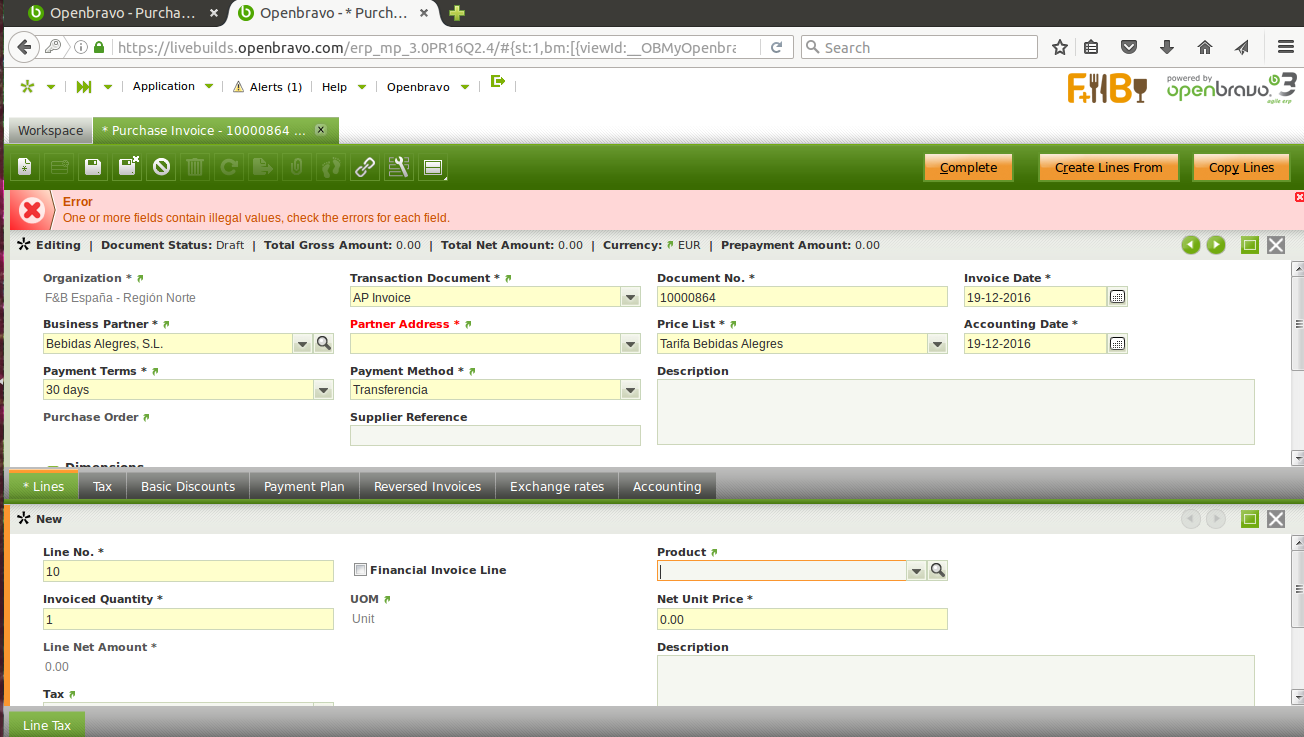
| Summary | 0034768: Autosave induces Partner Address is not saved following certain flow. Reproducible in FF 45.4.0, not in Chrome 52.0.2743.116 |
| Description | Partner Address field is not saved following certain flow with autosave.
Reproducible with Firefox 45.4.0.
Not reproducible with Chrome version 52.0.2743.116 (64-bit).
|
| Steps To Reproduce | 0-Login ERP as Openbravo.
1-Go to Purchase Invoice window.
2-Click "Create a new record in form" button.
3-Click arrow from Business Partner field and select "Bebidas Alegres, S.L."
4-Click Lines tab.
5-Click "Create a new record in form" button.
6-Click arrow from Product field and select "Cerveza Ale 0,5L".
7-Click Complete button. And click OK button in that popup.
8-Click "Create a new record in form" button.
9-Click arrow from Business Partner field and select "Bebidas Alegres, S.L."
10-Click Lines tab. DEFECT: Realise Partner Address is empty
11-Click "Create a new record in form" button.
12-Click arrow from Product field and select "Cerveza Ale 0,5L". Save that record. It is saved even with an error. |
| Proposed Solution | |
| Additional Information | |
| Tags | No tags attached. |
| Relationships | |
| Attached Files |  WrongFlowWithAutosave.png (137,664) 2016-12-19 11:16 WrongFlowWithAutosave.png (137,664) 2016-12-19 11:16
https://issues-new.openbravo.com/file_download.php?file_id=10191&type=bug
|
|
| Issue History |
| Date Modified | Username | Field | Change |
| 2016-12-19 11:16 | lorenzofidalgo | New Issue | |
| 2016-12-19 11:16 | lorenzofidalgo | Assigned To | => platform |
| 2016-12-19 11:16 | lorenzofidalgo | File Added: WrongFlowWithAutosave.png | |
| 2016-12-19 11:16 | lorenzofidalgo | OBNetwork customer | => No |
| 2016-12-19 11:16 | lorenzofidalgo | Web browser | => Mozilla Firefox |
| 2016-12-19 11:16 | lorenzofidalgo | Modules | => Core |
| 2016-12-19 11:16 | lorenzofidalgo | Triggers an Emergency Pack | => No |
| 2016-12-21 09:39 | alostale | Status | new => acknowledged |
| 2022-02-01 08:05 | alostale | Assigned To | platform => Triage Platform Base |