Openbravo Issue Tracking System - POS2 |
| View Issue Details |
|
| ID | Project | Category | View Status | Date Submitted | Last Update |
| 0058172 | POS2 | POS | public | 2025-03-07 12:18 | 2025-03-27 12:21 |
|
| Reporter | asier_perez | |
| Assigned To | Retail | |
| Priority | normal | Severity | minor | Reproducibility | always |
| Status | closed | Resolution | duplicate | |
| Platform | | OS | 5 | OS Version | |
| Product Version | | |
| Target Version | | Fixed in Version | | |
| Merge Request Status | |
| Review Assigned To | |
| OBNetwork customer | No |
| Support ticket | |
| Regression level | |
| Regression date | |
| Regression introduced in release | |
| Regression introduced by commit | |
| Triggers an Emergency Pack | No |
|
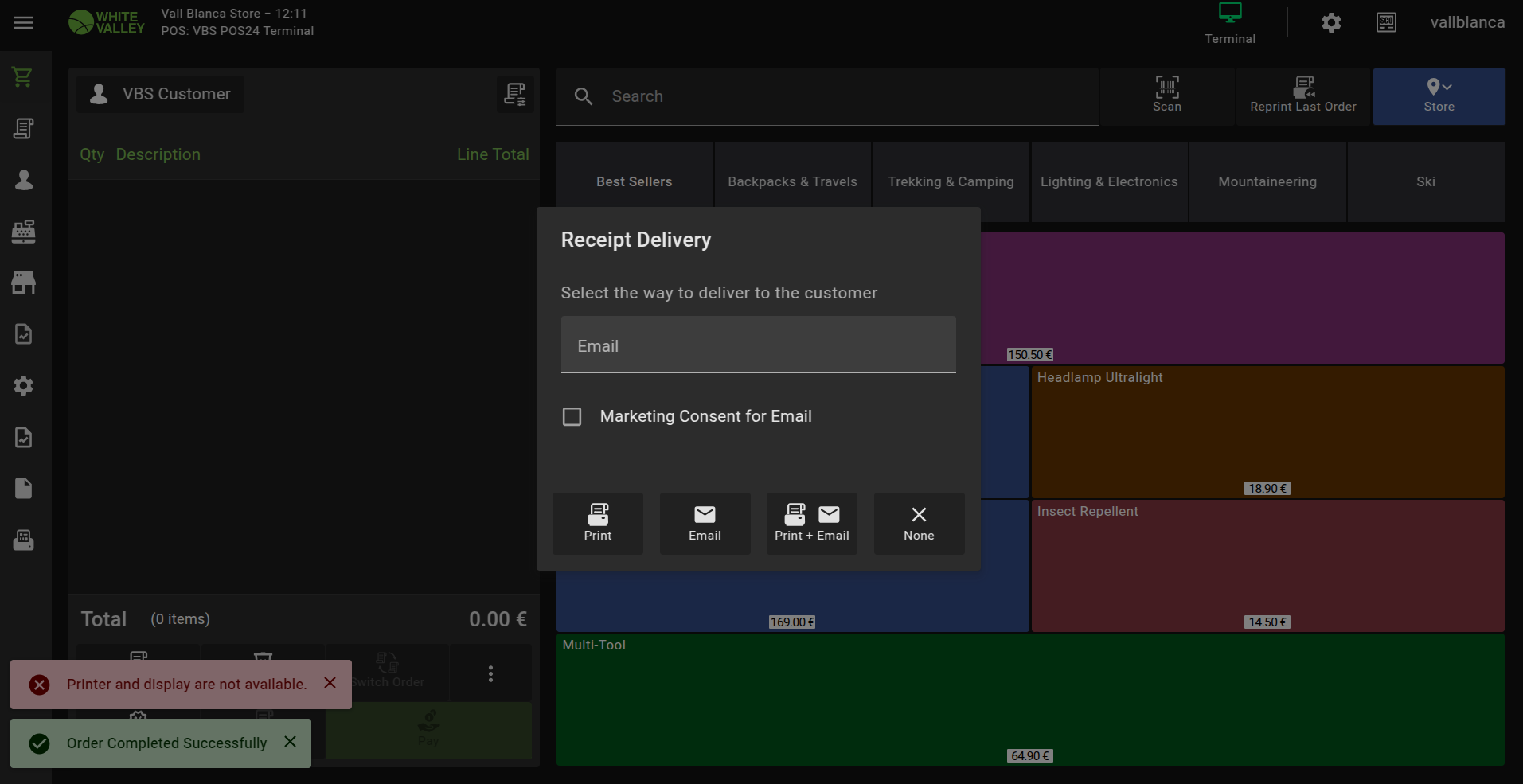
| Summary | 0058172: [25Q1] When "Print Receipt At Drawer Closure" is enabled, the Receipt Delivery pop-up appears twice and overlapped |
| Description | When "Print Receipt At Drawer Closure" is enabled in any payment method, the Receipt Delivery pop-up appears twice and overlapped when using this payment method to pay for an order. |
| Steps To Reproduce | 1) Log in to back office
2) Go to Channel - Touchpoint Type
3) Select "POS2SD VBS POS2 Terminal Type"
4) Open the Cash payment method from the Payment Methods tab
5) Mark the "Print Receipt At Drawer Closure" flag
6) Save the record
7) Log in to VBS-2 terminal in POS
8) Add a product to the order
9) Click on "Pay"
10) Select "Cash"
11) Click on "Done" and wait 1 or 2 seconds => The Receipt Delivery pop-up will appear, and then another Receipt Delivery pop-up will appear just overlapped with the first one. This can be noticed because the area outside the pop-up is darkened a bit more.
12) Select "None" => The second pop-up will be closed and the area outside the pop-up will be clarified a bit, and you will see the first pop-up will in the same place. |
| Proposed Solution | |
| Additional Information | |
| Tags | No tags attached. |
| Relationships | |
| Attached Files |  2ndpopup.png (131,825) 2025-03-07 12:18 2ndpopup.png (131,825) 2025-03-07 12:18
https://issues-new.openbravo.com/file_download.php?file_id=21017&type=bug
|
|
| Issue History |
| Date Modified | Username | Field | Change |
| 2025-03-07 12:18 | asier_perez | New Issue | |
| 2025-03-07 12:18 | asier_perez | Assigned To | => Retail |
| 2025-03-07 12:18 | asier_perez | File Added: 2ndpopup.png | |
| 2025-03-07 12:18 | asier_perez | OBNetwork customer | => No |
| 2025-03-07 12:18 | asier_perez | Triggers an Emergency Pack | => No |
| 2025-03-07 12:21 | asier_perez | Steps to Reproduce Updated | bug_revision_view_page.php?rev_id=29324#r29324 |
| 2025-03-17 16:48 | jorgewederago | Status | new => acknowledged |
| 2025-03-27 12:21 | hgbot | Note Added: 0177615 | |
| 2025-03-27 12:21 | hgbot | Status | acknowledged => closed |
| 2025-03-27 12:21 | hgbot | Resolution | open => duplicate |