Openbravo Issue Tracking System - Openbravo ERP |
| View Issue Details |
|
| ID | Project | Category | View Status | Date Submitted | Last Update |
| 0009698 | Openbravo ERP | 02. Master data management | public | 2009-06-29 14:15 | 2009-08-29 00:00 |
|
| Reporter | sureshbabu | |
| Assigned To | rafaroda | |
| Priority | high | Severity | major | Reproducibility | always |
| Status | closed | Resolution | no change required | |
| Platform | | OS | 5 | OS Version | |
| Product Version | 2.50MP2 | |
| Target Version | | Fixed in Version | | |
| Merge Request Status | |
| Review Assigned To | |
| OBNetwork customer | No |
| Web browser | |
| Modules | Core |
| Support ticket | |
| Regression level | |
| Regression date | |
| Regression introduced in release | |
| Regression introduced by commit | |
| Triggers an Emergency Pack | No |
|
| Summary | 0009698: Not able to generate invoice for Commission payment |
| Description | Not able to generate invoice for sales representative through Commission payment
(Sales Management || Transactions || Commission Payment || Header ) |
| Steps To Reproduce | 1) Create and complete a sales order ( Sales Management || Transactions || Sales Order || Header ) with the required details (note the Sales representative name).
2)Move to Sales Management || Setup || Commission || Header and click New
Business Partner / Sales Rep field: pick the sales representative the same one who we selected in the Sales order
Calculation Basis : Order (select any value)
Frequency Type :Monthly (select any value)
3) Move to lines tab, click new
In the reference section do not select any filters,
in the amounts section enter Multiplier Amount as .1(10%)
4) Move back to Header tab and click Generate Commission button . Process completed successfully message appears with Commission document id.
5) move to Sales Management || Transactions || Commission Payment || Header and select the above generated commission document in edit mode and click the Create invoice button.
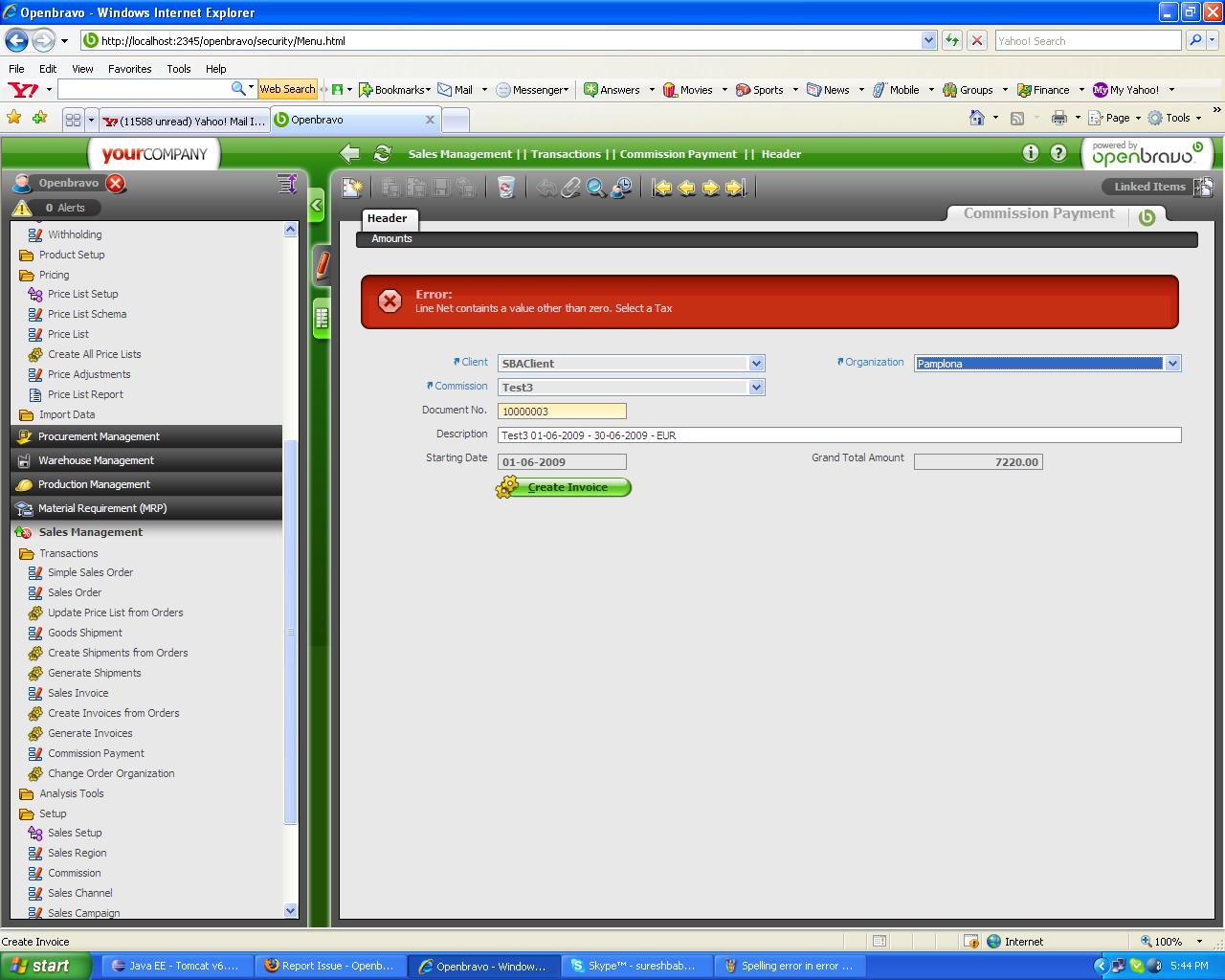
Getting error message as "Error:Line Net contains a value other than zero. Select a Tax"
|
| Proposed Solution | |
| Additional Information | |
| Tags | 250MP2QAcylce |
| Relationships | |
| Attached Files |  NOt able to generate invoice for commission payment.JPG (166,194) 2009-06-29 14:15 NOt able to generate invoice for commission payment.JPG (166,194) 2009-06-29 14:15
https://issues-new.openbravo.com/file_download.php?file_id=1494&type=bug
|
|
| Issue History |
| Date Modified | Username | Field | Change |
| 2009-06-29 14:15 | sureshbabu | New Issue | |
| 2009-06-29 14:15 | sureshbabu | Assigned To | => rafaroda |
| 2009-06-29 14:15 | sureshbabu | File Added: NOt able to generate invoice for commission payment.JPG | |
| 2009-06-29 14:15 | sureshbabu | OBNetwork customer | => No |
| 2009-06-29 14:16 | sureshbabu | Tag Attached: 250MP2QAcylce | |
| 2009-06-30 18:58 | psarobe | Note Added: 0017681 | |
| 2009-06-30 18:58 | psarobe | Status | new => feedback |
| 2009-08-28 12:37 | rafaroda | Status | feedback => closed |
| 2009-08-28 12:37 | rafaroda | Note Added: 0019256 | |
| 2009-08-28 12:37 | rafaroda | Resolution | open => no change required |
| 2009-08-29 00:00 | anonymous | sf_bug_id | 0 => 2846540 |